Usage Plans
Usage Plan Reports
Track usage plan progress, mileage targets, and resource utilisation through built-in reports.
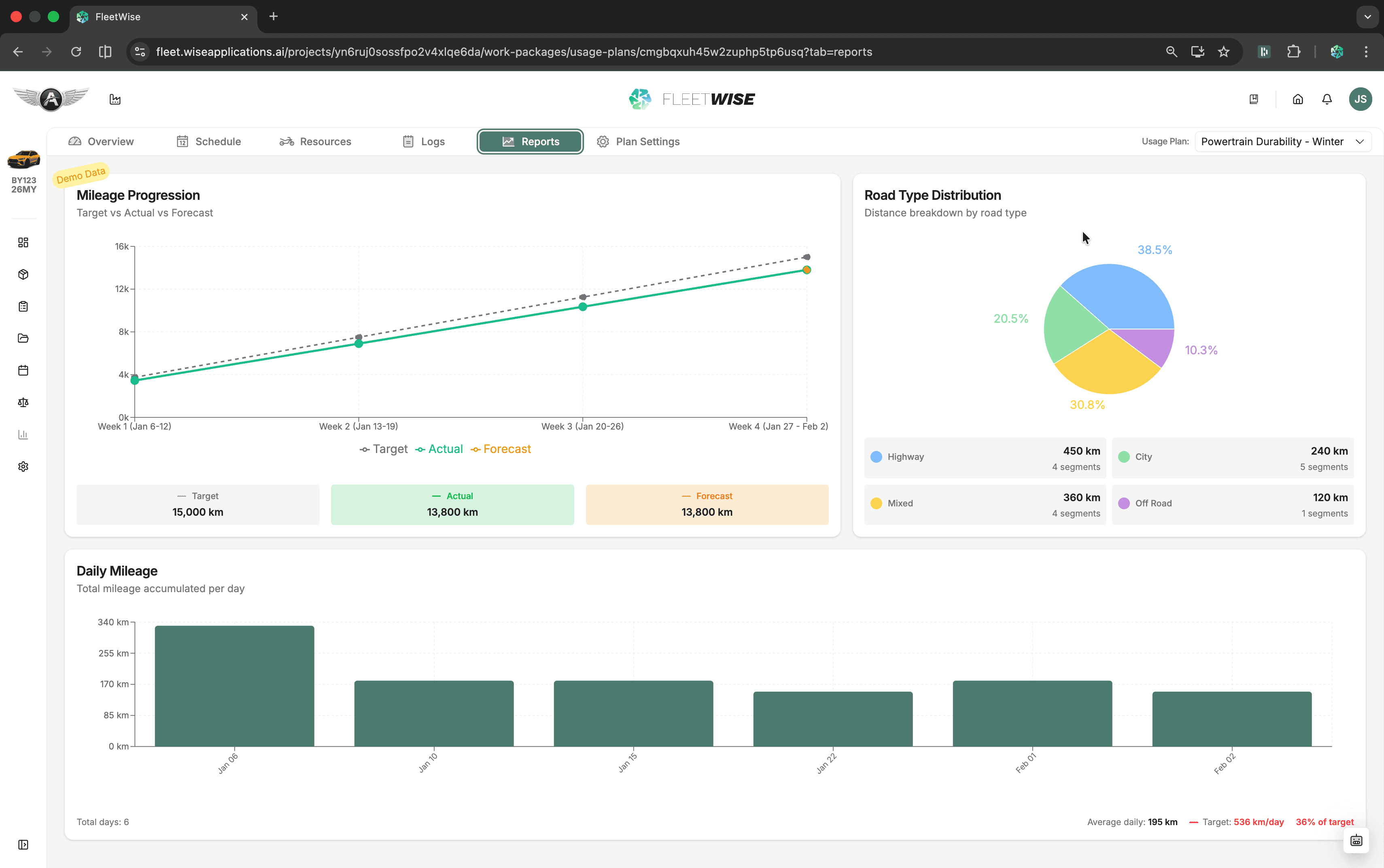
The report tab gives you a summary view of usage plan progress. Use it to compare actual mileage against targets, review resource utilisation, and identify whether the plan is on track.
Opening the Report Tab
Navigate to the usage plan and select the Report tab.
What the Report Shows
| Section | Content |
|---|---|
| Mileage Progress | Actual mileage vs. target, shown as a progress bar and cumulative chart |
| Daily Breakdown | Mileage logged per day over the plan period |
| Vehicle Utilisation | How much each vehicle was used relative to its available time |
| Driver Activity | Shift counts and mileage per driver |
Reading the Charts
- The cumulative mileage chart shows whether you are ahead of, on, or behind the target pace line.
- The daily bar chart highlights days with high or low activity.
- Hover over data points for exact values.
Using Reports for Planning
- If the pace line shows the plan is falling behind, consider adding shifts or drivers via the Schedule.
- If one vehicle is under-utilised, check its availability and shift assignments in Managing Resources.
- Use the driver activity breakdown to rebalance workload across the team.
Known Limitations
- Reports reflect published data only — unpublished draft changes are not included.