Projects
Project Dashboard
Your personal project dashboard — allocated vehicles, requests, handovers, and team views.
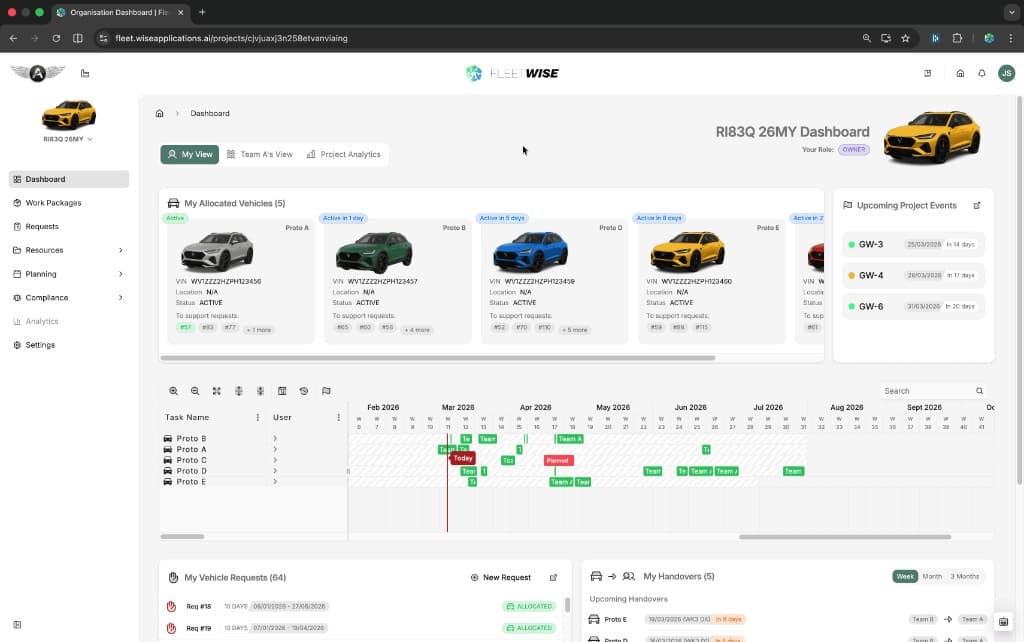
The project dashboard is the first page you see when you open a project. It shows your personal allocation and request activity, with the option to switch to a team view.
Accessing the Dashboard
Select a project from the workspace homepage or use the project selector in the sidebar. The dashboard loads as the default view.
Dashboard Views
The dashboard has tabs at the top to switch between views:
| Tab | What It Shows |
|---|---|
| My View | Your own allocated vehicles, requests, handovers, and upcoming project events |
| Team View | Shared allocations and activity for a specific team (e.g. "Team A's View") |
| Project Analytics | Project-level metrics and reporting |
My View Panels
| Panel | Content |
|---|---|
| My Allocated Vehicles | Vehicles currently allocated to you, with status badges (Active, Active in X days, etc.) |
| Vehicle Timeline | Gantt view of your vehicle allocations over time |
| My Vehicle Requests | Your submitted requests with status and date range |
| My Handovers | Upcoming vehicle handovers with dates, teams, and direction |
| Upcoming Project Events | Project milestones and events on the horizon |
Team View
If you belong to a team that shares vehicle allocations, you can switch to the team tab to see allocations and activity across all team members. This is useful for teams that coordinate shared vehicles.
Tips
- Start each day on My View to check your current allocations and any upcoming handovers.
- Use the Vehicle Timeline to see how your allocations line up over the coming weeks.
- Switch to Team View when coordinating shared vehicles with colleagues.
- Use New Request (shortcut in the requests panel) to submit a request without leaving the dashboard.